


Disabling Messenger
For computers running Windows 2000, XP and 2003 Server, these messages have popped up once too many. Chances are, if you're seeing messages like this:
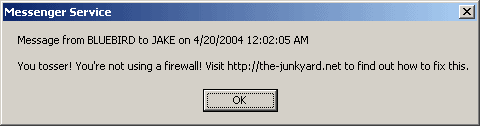
You likely don't have a firewall enabled, signifying that your computer is at high risk of being vulnerable to attack.
First things first: Let's get rid of these nuisances. Mostly, they're harmless, although annoying. Additionally you want to disable the Messenger service because a cracker could potentially send you a harmful message, crashing your system and stealing data.
Keep in mind that if you use Windows Messenger or MSN Messenger, the Messenger Service within Windows is a totally different item. Performing these steps will not get rid of your Windows/MSN Messenger. The Messenger in this article is Net Messenger, a Windows program that is designed to receive network messages from a LAN. People have figured out that they can send advertisements to computers on the Internet, with this service enabled.
Procedure
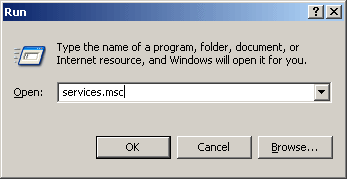
1. Click on your Start button, then type services.msc into the Run box as shown:
2. From the Services list, choose the Messenger entry:
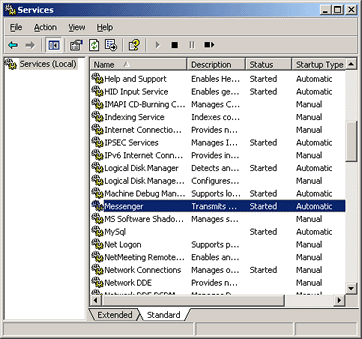
If its Startup Type is "Automatic" or "Manual", or its Status is "Started", you'll want to disable it.
3. Right-click on the Messenger entry and choose Properties. A dialog box will appear; select "Disabled" from the "Startup Type" dropdown box, and then click the "Stop" button:
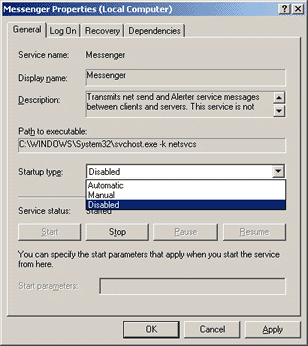
When you click the Stop button, a progress dialog appears. Wait until it disappears, and then choose the OK button from the dialog box. Your Services window should now appear as:
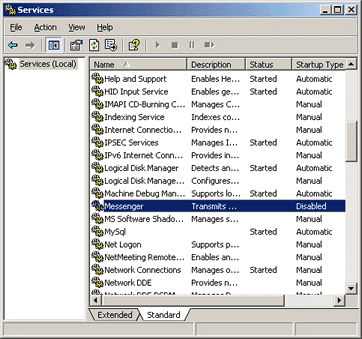
Close the Services window and the procedure is complete! (At this point, you may also want to consider taking some of the steps in my Network Security with Windows XP article for better protection.)
Any comments about this procedure? Post them to this tJY Forum thread.


